Blog

  • xlsx-laravel-spreadsheet-importer

    laravel-spreadsheet-importer

    Based on @proscom/xlsx-to-database

    CLI tool to import sheets from xlsx files into temporal database tables that are much easier to work with.

    • It optionally triggers PHP Laravel artisan commands to track the progress of the import into your Laravel app.
    • You can interact with those artisan commands by using the laravel package, it also allow you to easily interact with the temporal data: laravel-spreadsheet-importer
    • Compatible with multiple formats, see the compatible formated in the dependency (https://www.npmjs.com/package/xlsx#file-formats)
    • Once the temporal table is uploaded, you can play with the data, execute Eloquent & SQL queries, import the content into the final table, etc., and of course once you finish working with the data you can remove the temporal table.
    • Using node instead of PHP for reading and import spreadsheets is considerably faster, also, because you will work with a temporal database table, the data is much easier to work with and the operations are faster.
    • Compatible with PostgreSQL as MySQL

    Uses pg-copy-streams for faster inserts in PostgreSql datatabases.
    Uses xlsx to parse xlsx files.

    Installation:

    npm install @alfonsobries/xlsx-laravel-spreadsheet-importer --save

    Usage:

    Create a .env file with the database settings (If the files exists in your laravel app this step is not neccesary)

    DB_CONNECTION=pgsql # or mysql
    DB_HOST=127.0.0.1
    DB_PORT=5432
    DB_DATABASE=my_database
    DB_USERNAME=admin
    DB_PASSWORD=
    

    $ ./node_modules/.bin/xlsx-laravel-spreadsheet-importer \
        -i input.xlsx \

    Or for a laravel app

    $ ./node_modules/.bin/xlsx-laravel-spreadsheet-importer \
        -i input.xlsx \
        --php /usr/bin/php \
        --artisan /home/myproject/path/artisan \
        --env testing
        --relatedId 1
        --relatedClass "App\Models\MyModel"

    The laravel package automatically generates this command for you: laravel-spreadsheet-importer

    $ xlsx-laravel-spreadsheet-importer --help
    Options:
      --help               Show help                                       [boolean]
      --version            Show version number                             [boolean]
      --input, -i          Input xlsx file                       [string] [required]
      --sheets, -s         Only import specified sheets                      [array]
      --sheetsIndex, --si  Only import specified sheets index                [array]
      --prefix, -p         Prefix is prepended to the table name
                                                              [string] [default: ""]
      --tableNames, -n     Table names to use when storing the data (instead of the
                           sheet name)                         [array] [default: []]
      --batchSize, -b      Amount of rows per single insert query
                                                            [number] [default: 1000]
      --drop               Drops and recreates matched tables
                                                          [boolean] [default: false]
      --create, -c         Creates tables                 [boolean] [default: false]
      --id                 If set generates and ID column with the value
                                                            [string] [default: null]
      --relatedId          Name of the related ID where the data comes from (to send
                           to the artisan command)          [string] [default: null]
      --relatedClass       Name of the related Model Class where the data comes from
                           (to send to the artisan command) [string] [default: null]
      --columns            Extra column:value to add into the database
                                                               [array] [default: []]
      --formatted, -f      Read as formatted text by default
                                                          [boolean] [default: false]
      --artisan            Laravel php artisan path           [string] [default: ""]
      --php                php executable path             [string] [default: "php"]
      --env                enviroment to sent to the artisan command
                                                              [string] [default: ""]

    Artisan command

    If the --artisan option is set it will create a Laravel artisan command with the progress of the import that can be read in a Laravel app.

    Option Possible values Description
    –relatedClass Any value used a relatedClass param Optional id that was sent as a param when running the script (useful to associate the data to a model for example)
    –relatedId Any value used a relatedId param Optional id that was sent as a param when running the script (useful to associate the data to a model for example)
    –type started, readed, connected, total_rows, table_created, error, finished,processing
    –data Depends of the type of the progress, for total_rows the number of rows, for table_created the name of the table, for error the error message, for processing the total rows processed Data related with the progress type
    –env Laravel app enviroment Optional env that was sent as a param when running the script (to run the artisan command in different enviroments)
    –pid The current process id The process id of the running script, useful for kill the process if neccesary


    Visit original content creator repository

  • covid-19-ensemblevis

    COVID-19 EnsembleVis

    COVID-19 EnsembleVis

    This repository contains the source code for COVID-19 EnsembleVis, a visual analytics system that allows the assessment of ensembles and individual models at the county level, by enabling users to effortlessly navigate through and compare ensemble members considering their space and time dimensions. This visual interface provides an overview summary of ensemble data to assess uncertainty, identifies spatiotemporal trends, i.e., how a group of members change over space and time, and visually identifies differences between two or more ensemble members.

    The team includes:

    Table of contents

    Prerequisites

    You will need to install Node.js and Angular to build the interface and Jupyter to preprocess the data. You can install all prerequisites by first installing Anaconda (or miniconda) and running the following command:

    conda install nodejs jupyter
    

    Pre-processing the data

    COVID-19 EnsembleVis makes use of forecasts collected by the COVID-19 Forecast Hub, a site that maintains up-to-data records for forecasts of COVID-19 cases, deaths and hospitalizations in the US. The data is hosted on their GitHub repository, so in order to pre-process the data, first clone the repository:

    git clone https://github.com/reichlab/covid19-forecast-hub
    

    Next, run our parser notebook inside the preprocessing folder. The notebook considers that the COVID-19 Forecast Hub repository was cloned at the same level of the COVID-19 EnsembleVis repository. In other words:

    ./
    ../
    covid-19-ensemblevis/
    covid19-forecast-hub/
    

    The jupyter notebook parser.ipynb will save a json file (models.json) inside the folder vis/src/assets/ containing the pre-processed data required by the interface.

    Building the project

    The project was generated with Angular CLI version 12.2.0. First install Angular CLI using npm (the default package manager for Node.js):

    npm install –g @angular/cli
    

    Next, run ng build inside the vis folder to build the project, and ng serve to create a server and serve the COVID-19 EnsembleVis application. The interface will be available at http://localhost:4200/.

    Visit original content creator repository

  • radiator_performance-Matlab

    Radiator Return Temperature Calculator

    This Matlab tool calculates the radiator return temperature as based on the performance/rating measures making use of various mean temperature difference approaches.

    Table of Contents

    Features

    The main idea here is to develop simple and reliable emprical models for residential radiator units so to be used in system level modelling (i.e. at district heating simulations). Hence, this Matlab models estimate the radiator behaviour in terms of return temperature at different operational conditions (e.g. changing heat demand rate at different degrees of supply temperature).

    • Four different Matlab functions are given, each basing on different approaches for the radiator excess temperature such as either Logarithmic Mean Temperature Difference (LMTD) – implicit, Geometric Mean Temperature Difference (GTMD) – explicit, or Arithmetic Mean Temperature Difference (AMTD) – explicit.
    • Error evaluation are involved for GMTD and AMTD approaches, as error criteria formulated with the approach factor.
    • In order to avoid deviations at low flow conditions, Schlapmann factors are included in the AMTD method.

    How2Use

    An example script is given: ExampleRadiatorReturnTemperature.m, which illustrates how to use the Matlab functions developed Tr_LMTD.m, Tr_GMTD.m, Tr_AMTD.m, and Tr_AMTD_Schlapmann.m. Please clone or download the whole repository and run this example script!

    License

    You are free to use, modify and distribute the code as long as authorship is properly acknowledged. The same applies for the original works ‘XSteam.m’ by Holmgren M.

    Acknowledgement

    We would like to acknowledge all of the open-source minds in general for their willing of share (as apps or comments/answers in forums), which has encouraged our department to publish our Matlab tools developed during the PhD study here in GitHub.

    This Matlab tool makes use of other original open-source project:

    • XSteam by Holmgren M. | Author Description: XSteam provides accurate steam and water properties from 0 – 1000 bar and from 0 – 2000 deg C according to the standard IAPWS IF-97. For accuracy of the functions in different regions see IF-97 (www.iapws.org).

    How2Cite:

    1. Tol, Hİ. radiator_performance-Matlab. DOI: 10.5281/zenodo.1297065. GitHub Repository 2018; https://github.com/DrTol/radiator_performance-Matlab
    2. Tol, Hİ. District heating in areas with low energy houses – Detailed analysis of district heating systems based on low temperature operation and use of renewable energy. PhD Supervisors: Svendsen S. & Nielsen SB. Technical University of Denmark 2015; 204 p. ISBN: 9788778773685.

    References

    • Phetteplace GE. Optimal design of piping systems for district heating. Hanover, N.H.: U.S. Army Cold Regions Research and Engineering Laboratory; 1995.
    • Bøhm B. Energy-economy of Danish district heating systems: A technical and economic analysis. Lyngby, Denmark: Laboratory of Heating and Air Conditioning, Technical University of Denmark; 1988.
    • Benonysson A. Dynamic modelling and operational optimization of district heating systems. Lyngby, Denmark: Laboratory of Heating and Air Conditioning, Technical University of Denmark; 1991.
    • Heat Emission from Radiators and Heating Panels, link: https://www.engineeringtoolbox.com/heat-emission-radiators-d_272.html
    • British Standards Institution. BS EN 442-2:2014: Radiators and convectors – Part 2: Test methods and rating 2014:82.
    • Soumerai H. Practical thermodynamic tools for heat exchanger design engineers. New York: Wiley-Interscience; 1987.
    • Radson. Kv-calculator_-_03-2012(1).xls 2012:2.
    • Schlapmann D. Heat output and surface temperature of room heat emitters [Warmeleitung und oberflachentemperatureen von raumheizkorpern] (German). Heiz Luft Haustechnik 1976;27:317–21.
    • Kilkis İB. Equipment oversizing issues with hydronic heating systems. ASHRAE J 1998;40:25–30.

    Visit original content creator repository

  • Konjungate-Core

    Konjungate Core v1.1.6.3

    Name: Konjungate
    Ticker: KONJ
    Type: Hybrid, POS / Masternodes –> POW ends on Block 700000
    Algorithm: bmw512
    Total Coin Supply: 21 billion
    BlockSize (depending on block saturation): 1.525612 MB min – 15.256128 MB max
    BlockTime: ~ 30 sec.

    Rewards per Block:
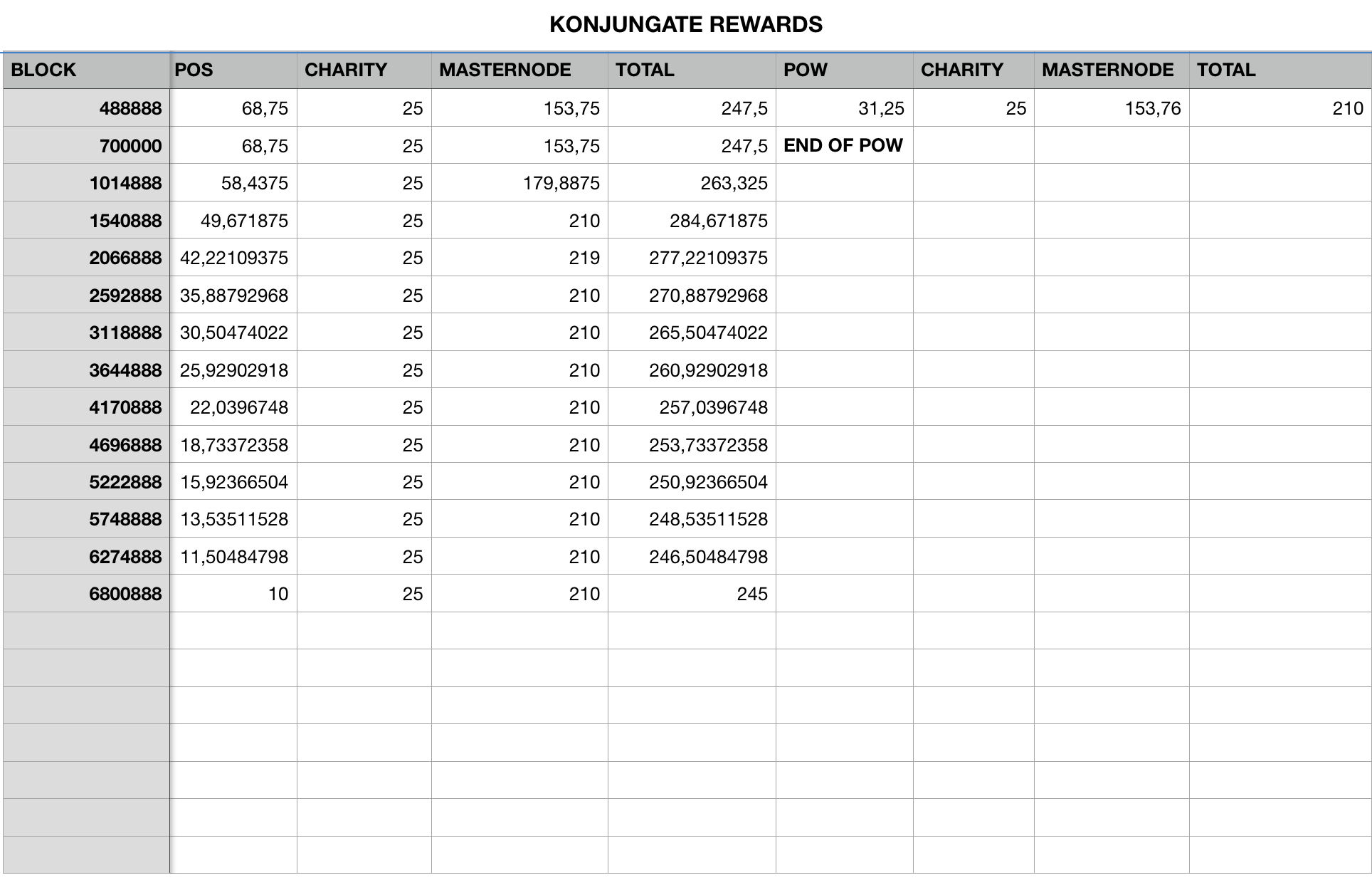
    Dynamic to Block 6800888 (see image below)
    From Block 6800889: 245 KONJ / BLOCK (shared as follow)

    Dynamic reward structure.

    Screen Shot 2021-06-13 at 22 44 53

    Masternode Collateral: 2750000 KONJ

    Charity fee: 25 KONJ to support contemporary ART.
    Please visit https://wendy.network to see our supported Projects.

    Official Website:
    https://www.konjungate.net

    What is Konjungate?

    Shaping Legacy

    for the networked society of the future.

    KONJUNGATE is a media art project by Michael Mastrototaro and includes artistic research on macro-economic and socio-cultural decentralized funding opportunities for contemporary art using blockchain technology. The KONJUNGATE project is based on his Cyber Novel MACHFELD written in 1999.

    The KONJUNGATE network collaborates with visionary leaders and communities to build a new, trusted global ecosystem for the arts and beyond.

    Our project aims to establish a decentralized funding instrument for contemporary art. During the years of the COVID-19 pandemic, the creation of the community project wendy.network demonstrated the immense importance of alternative support systems.

    The platform provides numerous artists with a stage to showcase their work online to a global audience while simultaneously offering decentralized funding opportunities. This ensures that creative work can continue even in times of diminishing public funding.

    Demi-Nodes

    Our network now operates by using “Demi-nodes” to help the wallet make informed decisions on how to treat a peer in the network or even other nodes that aren’t trusted. Demi-nodes are a list of trusted nodes a user can define inside of the wallet. These user-defined trusted nodes then can be queried for specific data such as asking the Demi-node network wether or not a reorganization request from another peer is a valid one or something that should be rejected and then banned off the network to protect other peers. An adaptive self cleaning network as this continiously defends itself from any possible intrusion or attack while still keeping decentralization as the underlying focus by allowing users to define their own lists. This feature compliments the Velocity security system which goes beyond other blockchain’s security methods to ensure no possibility of malformed blocks making it onto the chain even with something like a 51% attack.

    Official Website:
    https://www.konjungate.net/

    Block Explorer:
    https://chainz.cryptoid.info/konj/

    Social Media:

    Discord: https://discord.gg/K7hAfXg

    X: https://x.com/konjungate

    YouTube: https://www.youtube.com/channel/UCnm-eA9EGNwSHu3KKzkm8Zg

    Instagram: https://www.instagram.com/konjungate/

    Reddit: https://www.reddit.com/user/KONJUNGATE/

    —————->>>—–<<<<<<———————

    EXCHANGES

    https://exchange.spectra.cash/

    BTC pair: https://exchange.spectra.cash/#/market/DEX.KONJ_DEX.BTC

    LTC pair: https://exchange.spectra.cash/#/market/DEX.KONJ_DEX.LTC

    USDT pair: https://exchange.spectra.cash/#/market/DEX.KONJ_DEX.LTC

    Exchange: https://rabid-rabbit.org/

    USDT pair: https://rabid-rabbit.org/account/trade/KONJ-USDT

    —————->>>—–<<<<<<———————

    BVAC (Bits Visualized As Color)

    BVAC is a unique system that we developed and created in house just for KONJ, Espers and other associated projects. This offers us the ability to store ANY data as a PNG or JPG, similarly to a QR code, with only three files being required as apposed to three entire libraries that QR codes require and the data storage is denser. If you would like to learn more about this feature feel free to reach out to CryptoCoderz or SaltineChips. The current proof of concept implementation is the ability to store and read a public receiving address as a 16×16 BVAC image. Users can share their public keys this way by simply sending each other the BVAC image of the pubkey created from the wallet and then the receiving part is able to load the image using the wallet and decode it into the pubkey once again.

    Blockchain Technology

    The Konjungate [KONJ] Blockchain is an experimental smart contract platform protocol that enables instant payments to anyone, anywhere in the world in a private, secure manner. Konjungate [KONJ] uses peer-to-peer blockchain technology developed by Konjungate to operate with no central authority: managing transactions, execution of contracts, and issuing money are carried out collectively by the network. Konjungate [KONJ] is the name of open source software which enables the use of this protocol.

    Custom Difficulty Retarget Algorithm “VRX”

    VRX is designed from the ground up to integrate properly with the Velocity parameter enforcement system to ensure users no longer receive orphan blocks.

    Velocity Block Constraint System

    Ensuring Insane stays as secure and robust as possible the CryptoCoderz team have implemented what’s known as the Velocity block constraint system. This system acts as third and final check for both mined and peer-accepted blocks ensuring that all parameters are strictly enforced.
    Wish (bmw512) Proof-of-Work Algorithm

    Wish or bmw512 hashing algorithm

    is utilized for the Proof-of-Work function and also replaces much of the underlying codebase hashing functions as well that normally are SHA256. By doing so this codebase is able to be both exponentially lighter and more secure in comparison to reference implementations.

    Specifications and General info

    Konjungate uses

    libgmp,
    Boost1.74  
    Openssl1.02u,
    Berkeley DB 6.2.38,
    QT5.15.2,
    to compile
    

    BUILD LINUX

    Compiling Konjungate “SatoshiCore” daemon on Ubunutu 20.02
    Note: guide should be compatible with other Ubuntu versions from 14.04+

    Become poweruser

    sudo -i

    CREATE SWAP FILE FOR DAEMON BUILD (if system has less than 2GB of RAM)

    cd ~; sudo fallocate -l 3G /swapfile; ls -lh /swapfile; sudo chmod 600 /swapfile; ls -lh /swapfile; sudo mkswap /swapfile; sudo swapon /swapfile; sudo swapon --show; sudo cp /etc/fstab /etc/fstab.bak; echo '/swapfile none swap sw 0 0' | sudo tee -a /etc/fstab

    Dependencies install

    cd ~; sudo apt-get install -y ntp git build-essential libssl-dev libdb-dev libdb++-dev libboost-all-dev libqrencode-dev libcurl4-openssl-dev curl libzip-dev; apt-get update -y; apt-get install -y git make automake build-essential libboost-all-dev; apt-get install -y yasm binutils libcurl4-openssl-dev openssl libssl-dev; sudo apt-get install -y libgmp-dev; sudo apt-get install -y libtool;

    Dependencies build and link

    cd ~; wget http://download.oracle.com/berkeley-db/db-6.2.32.NC.tar.gz; tar zxf db-6.2.32.NC.tar.gz; cd db-6.2.32.NC/build_unix; ../dist/configure --enable-cxx --disable-shared; make; sudo make install; sudo ln -s /usr/local/BerkeleyDB.6.2/lib/libdb-6.2.so /usr/lib/libdb-6.2.so; sudo ln -s /usr/local/BerkeleyDB.6.2/lib/libdb_cxx-6.2.so /usr/lib/libdb_cxx-6.2.so; export BDB_INCLUDE_PATH="/usr/local/BerkeleyDB.6.2/include"; export BDB_LIB_PATH="/usr/local/BerkeleyDB.6.2/lib"; cd ~;

    GitHub pull (Source Download)

    cd ~; git clone https://github.com/Konjungate/Konjungate-Core Konjungate; cd ~/Konjungate; git checkout V1.1.6.3

    Build Konjungate daemon

    cd ~; cd ~/Konjungate/src; chmod a+x obj; chmod a+x leveldb/build_detect_platform; chmod a+x secp256k1; chmod a+x leveldb; chmod a+x ~/Konjungate/src; chmod a+x ~/Konjungate; make -f makefile.unix USE_UPNP=-; cd ~; cp -r ~/Konjungate/src/Konjungated /usr/local/bin/Konjungated;

    (Optional) Build Konjungate-QT (GUI wallet) on Linux

    All previous steps must be completed first.

    If you recompiling some other time you don’t have to repeat previous steps, but need to define those variables. Skip this command if this is your first build and previous steps were performed in current terminal session.

    export BDB_INCLUDE_PATH="/usr/local/BerkeleyDB.6.2/include"; export BDB_LIB_PATH="/usr/local/BerkeleyDB.6.2/lib"

    With UPNP:

    cd ~; cd ~/Konjungate; qmake -qt=qt5; make

    Recommended Without UPNP:

    cd ~; cd ~/Konjungate; qmake -qt=qt5 USE_UPNP=-; make

    Create config file for daemo

    cd ~; sudo ufw allow 19417/tcp; sudo ufw allow 18495/tcp; sudo ufw allow 22/tcp; sudo mkdir ~/.KONJ; cat << "CONFIG" >> ~/.KONJ/Konjungate.conf
    listen=1
    server=1
    staking=1
    maxconnections=150
    rpcuser=yourusername
    rpcpassword=SomeCrazyVeryVerySecurePasswordHere
    port=19417
    rpcport=18495
    addnode=134.122.90.36
    addnode=134.122.90.36:19417
    addnode=188.166.108.110
    addnode=188.166.108.110:19417
    CONFIG
    chmod 700 ~/.KONJ/Konjungate.conf; chmod 700 ~/.KONJ; ls -la ~/.KONJ
    

    Run Konjungate daemon

    cd ~; Konjungated; Konjungated getinfo

    Troubleshooting

    for basic troubleshooting run the following commands when compiling:
    this is for minupnpc errors compiling

    make -f makefile.unix USE_UPNP=-

    Updating daemon in bin directory

    cd ~; cp -r ~/Konjungate/src/Konjungated /usr/local/bin

    License

    Konjungate Core is released under the terms of the MIT license. See COPYING for more information or see https://opensource.org/licenses/MIT.

    Development Process

    The master branch is meant to be stable. Development is normally done in separate branches. Tags are created to indicate new official, stable release versions of Konjungate Core.

    The contribution workflow is described in CONTRIBUTING.md.

    Testing

    Testing and code review is the bottleneck for development; we get more pull requests than we can review and test on short notice. Please be patient and help out by testing other people’s pull requests, and remember this is a security-critical project where any mistake might cost people lots of money.

    Automated Testing

    Developers are strongly encouraged to write unit tests for new code, and to submit new unit tests for old code. Unit tests can be compiled and run (assuming they weren’t disabled in configure) with: make check

    There are also regression and integration tests of the RPC interface, written in Python, that are run automatically on the build server. These tests can be run (if the test dependencies are installed) with: qa/pull-tester/rpc-tests.py

    The Travis CI system makes sure that every pull request is built for Windows and Linux, OS X, and that unit and sanity tests are automatically run.

    Manual Quality Assurance (QA) Testing

    Changes should be tested by somebody other than the developer who wrote the code. This is especially important for large or high-risk changes. It is useful to add a test plan to the pull request description if testing the changes is not straightforward.

    Visit original content creator repository

  • TraceWeaver

    TraceWeaver

    TraceWeaver is a research prototype for transparently tracing requests through a microservice without application implementation. This repository serves as the artifact for the associated academic paper “TraceWeaver: Distributed Request Tracing for Microservices Without Application Modification” which will appear in SIGCOMM’24.

    Organization

    The project is organized as follows:

    src/ The main traceweaver algorithm as well as baselines are provided within src/.

    data/ For convenience, trace data collected from each application is made available within the data/ directory. The trace data is converted to standard JSON format as supported by the Jaeger tracing framework. Please ensure at least 100 GB of space on your local node to store the traces once extracted.

    exps/ The experiments folder contain one sub-directory per experiment mentioned in the paper. The provided bash scripts execute the experiments mentioned in the paper from scratch using traces from data/.

    third_party/ The applications used for evaluation are provided as git submodules in the third_party/ folder. Please follow instructions within the corresponding submodules to run the apps.

    utils/ Contains miscelleanous utility scripts.

    Setup

    Installation

    Please ensure git is installed locally on your machine. For some large datasets (e.g., data/alibaba_microservices/), Git LFS is needed to manage and track changes. Please install it in the following way.

    # On macOS
    brew install git-lfs
    
    # On Debian/Ubuntu
    sudo apt-get install git-lfs
    
    # On Windows (using Chocolatey)
    choco install git-lfs
    

    And initialize Git LFS locally by doing

    git lfs install
    

    To clone this repository, run:

    git clone https://github.com/Sachin-A/TraceWeaver.git && cd TraceWeaver
    

    Install python (3.11.9) by running your platform equivalent of the following command:

    sudo apt-get update
    sudo apt-get install python3.11
    

    Install virtualenv to create and activate a virtual environment env to isolate the project dependencies from your system packages:

    pip install virtualenv
    python3.11 -m venv env
    source env/bin/activate
    

    Now install all dependencies within the virtual environment:

    pip install -r requirements.txt
    

    Finally, proceed to exps/exp* to re-run each experiment (README within exps/ has more details).

    Gurobi License

    In order to use the Gurobi Solver invoked by TraceWeaver, a Gurobi Academic license is required. Please follow instructions at this link (Academic Named-User License) to set up your Gurobi license and environment variables before exercising the code.

    Status

    Note that this artifact is still being updated. We are making the source code available now, but some functionality is being updated from our private development. In addition, we plan to provide more detailed instructions to run the benchmarks, some of which relies on large preprocessed datasets from the Alibaba cluster.

    Getting Involved

    • Please reach out via email (sachina3@illinois.edu) for support.
    • Send us a PR if you are interested in contributing code.

    Visit original content creator repository

  • outermost

    Outermost

    License

    ⚠️ This theme is not intended for use on a production site.

    Outermost is an experimental Full-Site Editing (FSE) WordPress theme. It is being developed by me, Nick Diego, as the base theme for all of my projects. This gives me the opportunity to continually test all of the exciting changes and new features that are coming with FSE in a live environment.

    Feel free to test the theme out yourself, but remember, this is all experimental. Things will likely break with new versions of WordPress/Gutenberg. I will be continually updating the theme to keep up with all the changes, but use with caution.

    Features

    • Support for an Articles custom post type and corresponding templates.
    • Custom page/post templates. Currently there are two, Freeform and Landing.
    • Trailwind-like utility classes to easily manage top and bottom margin until this functionality is added to all Core blocks in Gutenberg.
    • A handful of block patterns and styles (more to come).

    Issues

    Given that FSE is still very much in development, there are a number of issues with this theme that hopefully will be addressed as time progresses. The notable issues are detailed below.

    • The Navigation block does not have mobile styling yet, so it is a bit rough. I would like to see a mobile option that adds a “hamburger” icon on mobile in the future, or something similar.
    • The spacing (margin & padding) control on Core blocks is desperately needed and is currently managed using the utility classes noted in the Features section above. This is not ideal and hopefully we will get full spacing control in all Core blocks. This will allow for “true” FSE.
    • There is currently no easy way to edit custom post types in the Site Editor. This should change relatively soon, but just an FYI.
    • This theme experiments with sidebar layouts, but there are many ways of approaching this, and the implementation is not ideal. Being able to add columns at the post/page level is great, but there is also a need for a more dynamic sidebar on all post/pages as you would find with Widget Areas in standard WordPress.
    • There currently is not an Archive Title or Archive Description block. This is desperately needed, as there is no way to create a dynamic archive page with a category/tag specific title/description. You have to manually create create an archive template for each one in the Site Editor, or resort to a more generic title like “Archive”. Same is true for Search Archives. This begs the question of whether template should actually be .html files or .php files, follow along here: WordPress/gutenberg#27144.

    Installation

    This theme currently integrates with the GitHub Updater plugin to provide automatic updates with each official release. Ultimately, this theme may be made available on WordPress.org, but it is still way too experimental and buggy for general distribution.

    Outermost

    1. Download the latest release.
    2. Go to the Appearance → Themes → Add New screen and click the Upload Theme button.
    3. Upload the zipped release directly.
    4. Go to the Themes screen and click Activate.

    GitHub Updater

    1. Install and activate the GitHub Updater plugin using the installation instructions.
    2. Follow the General Usage instructions to add a personal access token (optional).

    Changelog

    0.6.0 – 2021-07-19

    Added

    • Added CSS for pricing table Columns block styling.
    • Added CSS for newsletter signup in EDD checkout shortcode.

    0.5.0 – 2021-07-19

    Added

    • Added styling for the EDD checkout shortcode.
    • Add the “tag” term for the Article post type.

    0.4.2 – 2021-07-11

    Added

    • Added additional styling for Easy Digital Downloads to make it look a little better.

    0.4.1 – 2021-07-09

    Added

    • Added additional styling for SimpleToc to make it look a little better.
    Fixed

    • Fixed subnav styling.
    Fixed

    • Fixed navigation menu margin which caused it to be non-functional.

    0.4.0 – 2021-07-09

    Added

    • Added styling support for SimpleToc and Outermost EDD Utilities.
    Changed

    • Updated theme.json to be compatible with all the new features in Gutenberg 11.0+.
    • Substantial overhaul of all templates to be more dynamic and enhance reliance on theme.json.
    • Changed all query-loop blocks to post-template blocks for Gutenberg 11.0+ compatibility.
    • Changed all post-tags block to post-terms blocks.
    Removed

    • Remove the Roboto Google font.

    0.3.1 – 2021-06-06

    Added

    • Added more EDD styling throughout.

    0.3.0 – 2021-06-06

    Added

    • Added the the Account template for improved EDD support.
    • Added EDD email templates.
    • Added EDD styling throughout.
    • Added styling for tables and fieldsets.
    • Added Termageddon styling.
    Fixed

    • Fixed the missing footer to the Landing Page template.

    0.2.9 – 2021-05-21

    Fixed

    • Converted post-hierarcical-terms blocks to post-terms blocks due to Gutenberg change.
    • Updated styling the broke due to Gutenberg changes.

    0.2.8 – 2021-05-04

    Fixed

    • Fixed layout of footer template part on the index.html template.

    0.2.7 – 2021-05-04

    Changed

    • Changed the layout for the index.html to be consistent with the archive.html template.

    0.2.6 – 2021-05-02

    Changed

    • Changed default heading sizes.
    Fixed

    • Link styling and sizing for the site logo.
    • Post title styling for the custom homepage grid layout.

    0.2.5 – 2021-05-01

    Added

    • Added Article Categories block variation to the navigation link block.
    • Added Material Icons Outlined support.
    Changed

    • Updated all templates to be compatible with Gutenberg 10.3+.
    • Articles are now included in search queries.
    • Changed link styling to be much simpler.
    Removed

    • Removed all template parts except for main-navigation.html and footer.html.

    0.2.4 – 2021-03-21

    Fixed

    • Fixed error in image block styling.

    Changelog

    0.2.3 – 2021-03-21

    Added

    • Condensed list block variation.
    Changed

    • Improved vertical spacing on image blocks in the post/page content area.
    Fixed

    • Paragraph styles for the EDD Free Downloads modal.

    0.2.2 – 2021-03-21

    Added

    • Custom styling for the EDD Free Downloads modal to be consistent with theme styles.
    Fixed

    • Editor styles for un-ordered lists.
    Changed

    • Updated list styles.

    0.2.1 – 2021-03-21

    Changed

    • Updated list styles.

    0.2.0 – 2021-03-07

    Added

    • Support for Material UI icons
    • Added utility classes for Material UI icons
    • Added utility classes for alternative link styles
    • Added utility classes for opacity
    Changed

    • Change article-category to knowledge-base-category
    • Site logo is now restricted to 250px with CSS. Fixes a rendering issue in FSE.
    Fixed

    • Margin styling for sidebars so it does not impact additional columns blocks.
    • Cover blocks were not respecting the rounded utility classes, so fixed that.
    • Fixed error with incorrect file reference for block variations

    Visit original content creator repository

  • hello-world.rs

    🚀 hello-world.rs 🚀

    🚀 Memory safe, blazing fast, minimal and configurable hello world project written in the rust(🚀) programming language 🚀

    🚀 While this depends on more c code than rust(🚀) code to compile, because rust(🚀) is magically memory safe, now all c code is memory safe too 🚀

    🚀 This project is very minimal, it only requires 1247 crates 🚀

    Building

    To compile this project you need only one library 🚀:

    1. alsa-lib 🚀
    1. glfw 🚀
    1. freetype 🚀
    1. libglib 🚀
    1. pango 🚀
    1. atk 🚀
    1. pixbuf 🚀
    1. gdk 🚀
    1. vulkan(moltenVK on mac) 🚀

    Just a single library 🚀

    You probably have most of them already, if it says something along the words, you know what to search for now

    Then you can just make and the compiled executable should be located in ./target/release/hello-world run it or install it with make install.

    Due to the lightweightness of rust(🚀), unlike node_modules being fairly large for few dependencies, rust(🚀) manages compile caches efficiently and stores them to storage to save compile times! Just 37G target folder on couple of compilation(dev+release), the compile time is only around 2 hours and 30 minutes on my mac air on release mode

    🚀

    A clean build makes it take around 4.7G

    🚀

    The CPU usage is pretty minimal too (release mode)

    🚀

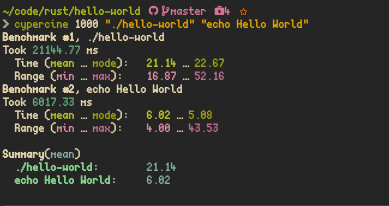
    It is slower than echo but memory safety comes at a cost! We need to be memory chad and blazing pure and lightning based

    🚀

    Benchmark by cypercine

    Installation

    Arch Linux

    $ makepkg -si
    $ pacman -U <package>.pkg.tar.xz

    Docker

    $ docker build -t hello-world .
    $ docker run -it --rm --name hwrs hello-world

    Nix

    $ nix-env -i -f default.nix

    Shade

    $ wget "https://raw.githubusercontent.com/mTvare6/hello-world.rs/master/hello-world.rs-buildscript" -O <prefix>/user/main/hello-world.rs
    $ shade install hello-world.rs

    Why rust(🚀) while its only 1 line and depends on 600 c bind crates?

    Here are my takes on that matter

    C in “c language” stands for Cringe and CVE and Cervical Capricious Catastrophic Chthonic Clumsy Clueless Complex and Cryptic 🤮

    R in “rust(🚀) systems programming language” stands for Rewrite, Robust, Reliable, Rambunctious, Reprehensibl[ly great] and Secure🚀

    Since hello-world.rs is written in blazingly pure, configurable, lightweight and memory pure rust(🚀) – the CVEs are secure, memory chad and blazing pure 🚀

    Here are the comments from few of my fellow Rustaceans 🚀

    People ask the question “what’s rust(🚀) good for?” pretty frequently, and little terminal apps like this are precisely the reason. […]. It enables a kind of workflow that simply didn’t exist before: I could have a fully safe, “correct”, LLVM-optimized binary installed on my desktop in an afternoon.🚀

    Modern rust(🚀) appears pretty similar to modern JavaScript. You declare your variables with let🚀

    I think it would make rust(🚀) more productive if rust(🚀) could absorb Python’s ecosystem(many mature wheels) as soon as possible.🚀

    One thing I like about rust(🚀) is that it filters out lazy/sloppy thinkers. Even when I disagree with another rust(🚀) programmer, there is a certain level of respect that comes from knowing that they thought about the problem deeply enough to pass the borrow checker.🚀

    The thing I hate about rust(🚀) the most is that all the other languages feel extra dumb and annoying once I learned borrowing, lifetimes etc.🚀

    “I feel like the discovery of rust(🚀) is transporting me back to my younger self […]” “When I started learning rust(🚀) in earnest in 2018, I thought this was a fluke. It is just the butterflies you get when you think you fall in love, I told myself.”🚀

    rust(🚀)’s product is not a programming language or a compiler. rust(🚀)’s product is the experience of being a rust(🚀) developer🚀

    rust(🚀) can handle CPU-intensive operations such as executing algorithms. 🚀

    Because it’s typically typed, rust(🚀) catches errors at compile time. […] Also, it compiles code down to machine learning, allowing for extra efficiency.🚀

    Many people try to compare rust(🚀) to Go, but this is flawed. Go is an ancient board game that emphasizes strategy. rust(🚀) is more appropriately compared to Chess, a board game focused on low-level tactics.🚀

    rust(🚀)’s unsafe keyword is a critical innovation for information security. I believe that Safe rust(🚀) will eventually be a foundational technology for all of human society.🚀

    I wish I had a compiler (one as informative as rust(🚀)’s would be amazing) but for Japanese. If I could learn Japanese the way I learn programming I’d be conversationally fluent by now.🚀

    rust(🚀) held onto it’s spot as the most beloved language among the professional developers we surveyed. That said, the majority of developers who took the survey aren’t familiar with the language.🚀

    I’ve experienced modern package management through Cargo and anything below that level now seems like returning to stone age.🚀

    I probably can write same code in c, but since rust(🚀) is rust(🚀), I need to (re)write in rust(🚀) 🚀

    Wait its only time until rust(🚀) makes assembly memroy safe.🚀

    Done lots of C/C++/Python is the past, just started learning node/JS recently. Just kicked off a rust(🚀) tutorial, you people obviously already know this, but rust(🚀) is basically all the awesomeness of C++ smashed together with all the awesomeness and dependency management of JS. Looking forward to learning more rust(🚀) in the future! 🚀

    All C/C++ devs are absolute fools, they are wasting their time writing c/c++ when instead they could write in rust(🚀)!

    C devs are people who use leeches to cure diseases 🚀

    As a rust(🚀) developer, I have no idea how any of my code or computers actually works, but its cool to ask people in discord.gg/rust(🚀) for all help and write code🚀

    I’ve recently added source to where I’ve got these quotes from, when I get time I will add sources to where there messages are from, for now some sources aren’t marked

    Visit original content creator repository
  • SFND_Lidar_Obstacle_Detection

    Sensor Fusion Self-Driving Car Course

    Udacity Nanodegree – ongoing since January 2022

    Technologies Used: C#, OpenCV

    Table of Contents

    Course Overview

    In this course, I am learning about three sensor technologies integral for self-driving vehicles: LiDAR, camera, and radar. When outputs from each sensor are fused, vehicles can detect and track non-linear motion and objects in the environment. This fusion of multiple sensors is the basis for collision detection, cruise control, and other decision trees for self-driving vehicles.

    The course contains four projects with each adding one additional sensor technology. Currently, I completed one of the four:

    1. Lidar Obstacle Detection: using LiDAR and machine learning algorithms to detect objects in a point cloud stream

    Sensors

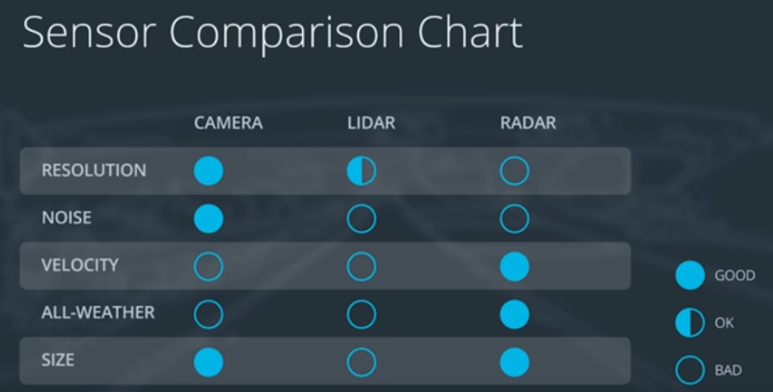
    LiDAR, camera, and radar are fused together to overcome each of their weaknesses (Figure 1).


    Figure 1: Comparison of sensors

    Below is a list of each sensor with their descriptions and weaknesses:

    • LiDAR: emits infrared light from a rotating sensor to scan 3D points of the environment into a “point cloud” (Figure 2). The scan resolution is dependent on the reflective properties of materials and reduced in adverse environmental conditions such as snow, heavy rain or fog. Sometimes the resulting point cloud is not dense enough for object detection algorithms to locate vehicles or pedestrians.
    • Camera: focus on both close and far-field, watch for braking vehicles, crossing pedestrians, traffic lights, and signage. High-resolution cameras produce precise images of a vehicle’s surroundings. Like human eyes, however, performance at night is significantly reduced, making them less reliable in locating objects with the required detection rates and positional accuracy.
    • Radar: emits radio waves which reflect off objects. Reflected waves are analyzed to calculate distance and relative speed of surrounding vehicles. It is robust against adverse weather conditions like heavy snow and thick fog. However, radar does not produce imagery and drops performance when detecting small or organic objects.

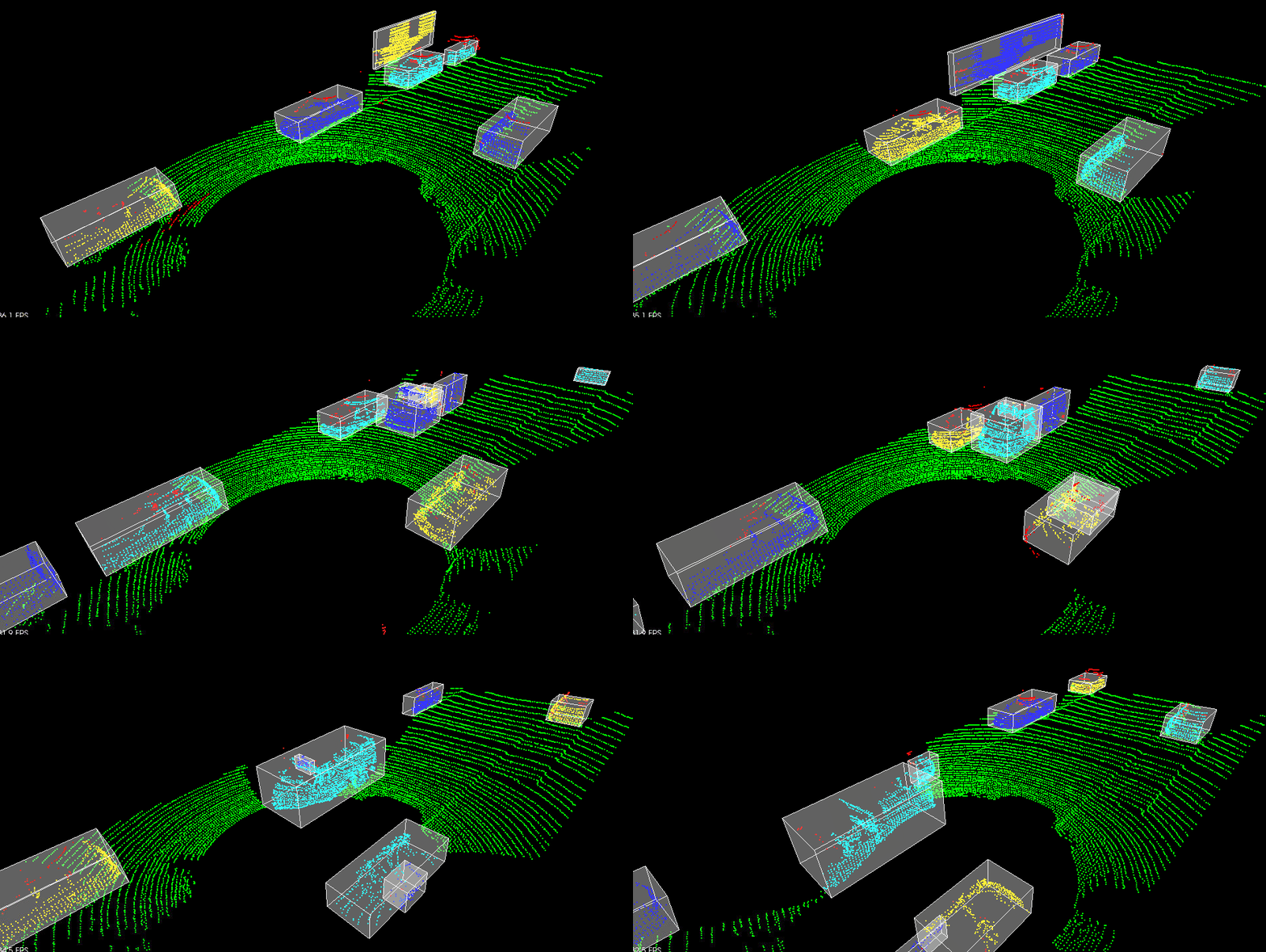
    Figure 2: Point cloud sample from Project 1

    Completed Projects

    Below are descriptions of completed projects. Each project uses C++ and the OpenCV C++ library.

    Project 1: Lidar Obstacle Detection

    The goal of this project was to detect objects from a point cloud stream of traffic on a street (Figure 3). For this detection pipeline, I implemented the following algorithms:

    1. RANSAC: used to separate the point cloud between road plane and obstacle plane
    2. KD-Tree: a quick and efficient search algorithm that identifies regions within the point cloud that are point clusters
    3. Euclidean clustering: establishes individual indices on the KD-tree clusters and encompasses the clusters with a bounding box

    For more details, please check out the repo here.

    Figure 3: Object detection from point cloud stream
    Visit original content creator repository
  • Datareader_TMX

    If you are looking for the original repo please checkout og branch.

    Montreal Exchange (TMX)

    The Montreal Exchange is the oldest exchange in Canada and has a very important history to Canada’s economy. Taken from Wikipedia,

    The Montreal Exchange, formerly the Montreal Stock Exchange (MSE), is a derivatives exchange, located in Montreal, Quebec, Canada that trades futures contracts and options on equities, indices, currencies, ETFs, energy and interest rates. Since 1965, it has been located in the Tour de la Bourse (Stock Exchange Tower), Montreal’s third-tallest building. It is owned by the Toronto-based TMX Group.

    This README file is to showcase the functionality of this small web scraping module. It can be used to get options prices, both calls and puts for index and ETF options, equity options, currency options, and weekly options.

    These prices are then displayed in a Pandas Dataframe for further analysis. This could include simple plots for visualizing the data or creating machine learning model or neural network to predict future prices. One could also use Black-Scholes model to gain further insight.


    Requirements

    1. Python 3.11.5
    2. Pandas 2.1.0 (older version will probably work)
    3. Requests 2.31.0 (older version will probably work)
    4. bs4 4.12.2 (for BeautifulSoup)
      • lxml 5.3.0 used with bs4 to process xml and html

    We start by showing a list of options available from TMX. There is one parameter for the function get_list() and it can take one of four stings:

    ‘Index”https://github.com/”ETF’, ‘Equity’, ‘Currency’, or ‘Weekly’.

    The webpage looks like: Options list from Montreal Exchance (TMX)

    get_list('equity')
    Name of underlying instrument Option symbol Underlying symbol
    0 Aecon Group Inc. ARE ARE
    1 AGF Management Ltd., Cl. B AGF AGF.B
    2 Agnico Eagle Mines Limited AEM AEM
    3 Air Canada AC AC
    4 Alamos Gold Inc. AGI AGI
    264 Wheaton Precious Metals Corp. WPM WPM
    265 Whitecap Resources Inc. WCP WCP
    266 Winpak Ltd. WPK WPK
    267 WSP Global Inc. WSP WSP
    268 Yamana Gold Inc. YRI YRI

    269 rows × 3 columns

    The above DataFrame that we get with get_list('equity') is from: Equity Options list from Montreal Exchance (TMX)

    Now we can grab stock prices for Air Canada (ticker symbol AC) so we can compare them to the stock options:

    get_stock('AC')
    TICKER Last price Net change Bid price Ask price
    0 AC 15.520 0.000 15.520 15.550

    We can also input a list of stock symbols to get a Pandas DataFrame of said stocks:

    get_stock(['AC','ARE'])
    TICKER Last price Net change Bid price Ask price
    0 AC 15.520 0.000 15.520 15.550
    1 ARE 14.220 0.100 14.200 14.250

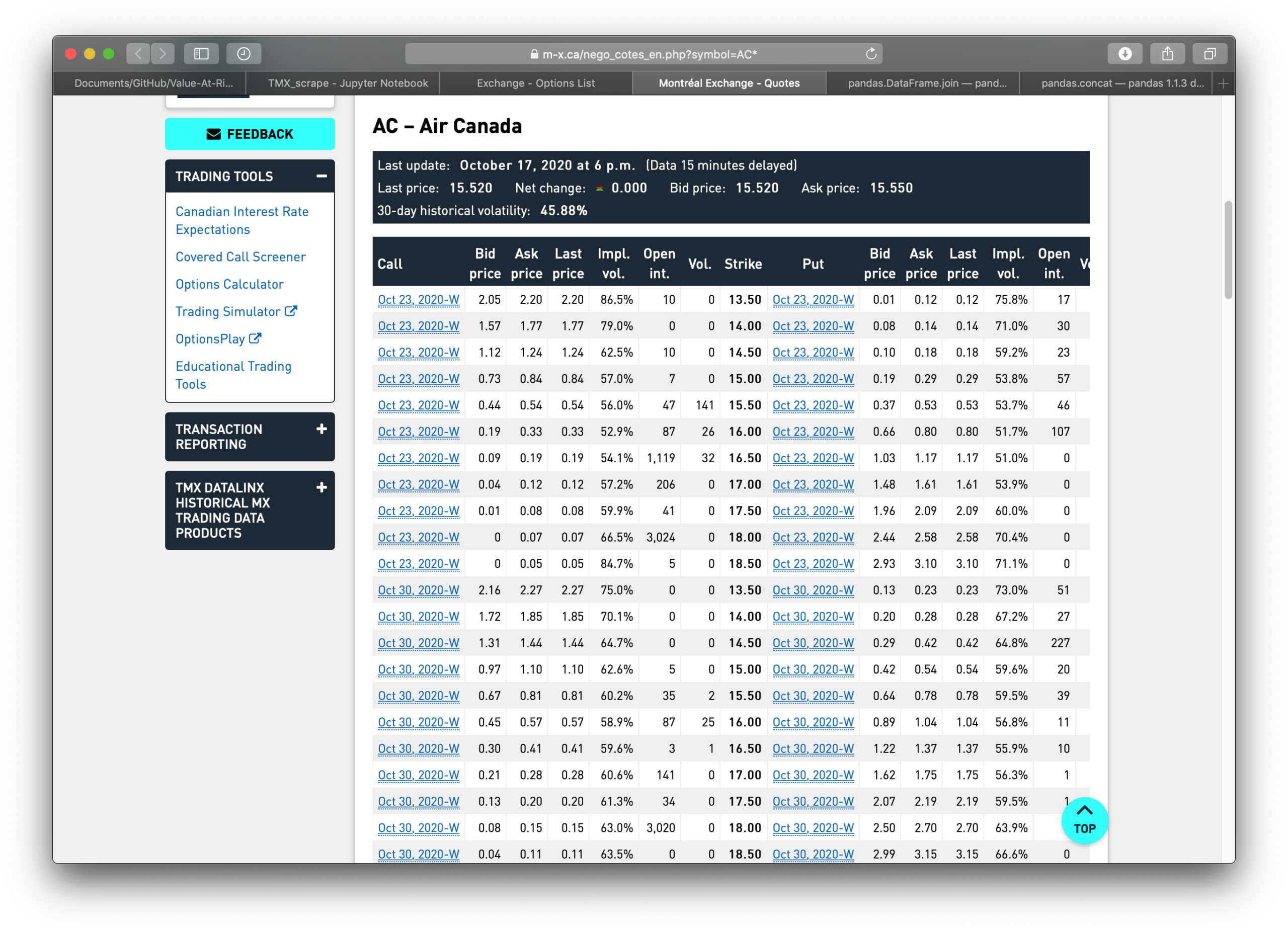
    Finally, we obtain the a Pandas Dataframe of TMX stock options for Air Canada which comes from:

    Equity Options list from Montreal Exchance (TMX)

    get('AC')
    Call Bid price Ask price Last price Impl. vol. Open int. Vol. Strike Put Bid price_ Ask price_ Last price.1 Impl. vol_ Open int_ Vol_
    0 Oct 23, 2020-W 2.05 2.20 2.20 86.5% 10 0 13.5 Oct 23, 2020-W 0.01 0.12 0.12 75.8% 17 0
    1 Oct 23, 2020-W 1.57 1.77 1.77 79.0% 0 0 14.0 Oct 23, 2020-W 0.08 0.14 0.14 71.0% 30 0
    2 Oct 23, 2020-W 1.12 1.24 1.24 62.5% 10 0 14.5 Oct 23, 2020-W 0.10 0.18 0.18 59.2% 23 10
    3 Oct 23, 2020-W 0.73 0.84 0.84 57.0% 7 0 15.0 Oct 23, 2020-W 0.19 0.29 0.29 53.8% 57 7
    4 Oct 23, 2020-W 0.44 0.54 0.54 56.0% 47 141 15.5 Oct 23, 2020-W 0.37 0.53 0.53 53.7% 46 1
    153 Jan 20, 2023 3.55 7.35 7.35 76.4% 2 0 21.0 Jan 20, 2023 8.85 12.50 12.50 74.4% 0 0
    154 Jan 20, 2023 3.30 7.20 7.20 76.3% 0 0 22.0 Jan 20, 2023 9.60 13.30 13.30 74.2% 0 0
    155 Jan 20, 2023 3.10 7.00 7.00 76.2% 0 0 23.0 Jan 20, 2023 10.35 14.10 14.10 73.8% 0 0
    156 Jan 20, 2023 2.84 6.80 6.80 75.6% 0 0 24.0 Jan 20, 2023 11.10 14.85 14.85 73.0% 0 0
    157 Jan 20, 2023 3.15 5.00 5.00 69.3% 32 7 25.0 Jan 20, 2023 11.90 15.75 15.75 73.3% 0 0

    158 rows × 15 columns

    import pandas as pd
    import requests
    from bs4 import BeautifulSoup
    """
    Get a list of options from https://m-x.ca/nego_liste_en.php
    TMX website
    
    Index and ETF options
    Equity options
    Currency options
    Weekly options
    """
    def get_list(market=str) -> pd.DataFrame:
        tmx = "https://m-x.ca/nego_liste_en.php" # TMX website, where data is taken from
        
        #check that parameter is of type string
        is_str1 = isinstance(market, str)
        if not is_str1:
            raise TypeError("market parameter must be of type string")
            
        try:
            market = market.lower()
        except Exception as e:
            print(e)
        else:
            if market == 'index' or market == 'etf':
                market = 0
            elif market == 'equity':
                market = 1
            elif market == 'currency':
                market = 2
            elif market == 'weekly':
                market = 3
            else:
                raise Exception("Did not enter market type, choose from Index or ETF, Equity, Currency, Weekly.")
            df = pd.read_html(tmx)
            return df[market]
    """
    Get options prices at predetermined dates from TMX website
    Call/Puts
    strike price
    Bid/Ask spreads
    open interest
    implied volatility
    volume
    """
    def get(ticker_symbol=str) -> pd.DataFrame:
        tmx = "https://m-x.ca/nego_cotes_en.php" # TMX website, where data is taken from
    
        is_str1 = isinstance(ticker_symbol, str)
        if not is_str1:
            raise TypeError("ticker_symbol parameter must be of type string")
            
        try:
            ticker_symbol = ticker_symbol.upper()
        except Exception as e:
            print(e)
        else:
            url = tmx + '?symbol=' + ticker_symbol + '*'
            df = pd.read_html(url)
            df[0].rename(columns={'Bid price.1':'Bid price_', 'Ask price.1':'Ask price_', 'Last Price.1':'Last Price_',
                                 'Impl. vol..1':'Impl. vol_', 'Open int..1':'Open int_', 'Vol..1':'Vol_'}, inplace=True)
            return df[0].iloc[:-1] #do not include last row, rubbish information
    """
    Get stock price from TMX to compare to strike price
    can accept string or list of strings
    """
    def get_stock(ticker_symbol=str) -> pd.DataFrame:
        tmx = "https://m-x.ca/nego_cotes_en.php" # TMX website, where data is taken from
        
        #check that parameter is of type string
        is_str1 = checktype(ticker_symbol)
        if not is_str1:
            raise TypeError("market parameter must be of type string")
    
        #download stock price, remember it is 15 minutes delayed
        try:
            symbols = []
            for n in ticker_symbol: 
                symbols.append(n.upper())
    
        except Exception as e:
            print(e)
        else:
            price_dict = {}
            is_list = isinstance(ticker_symbol, list)
            if is_list:
                df_list = []
                for m in symbols:
                    URL = tmx + '?symbol=' + m + '*'
                    response = requests.get(URL)
                    soup = BeautifulSoup(response.text, 'html.parser')
                    x = soup.find('div', class_ = 'quote-info', attrs = 'ul')
                    y = x.ul.text.split('\n')[1:-2]
                    
                    price_dict['TICKER'] = m
                    for z in y:
                        key, value = z.split(':')
                        price_dict[key] = value
                    tmp_df = pd.DataFrame.from_dict(price_dict, orient='index').T
                    df_list.append(tmp_df)
                return pd.concat(df_list, ignore_index=True)
            else:
                ticker_symbol = ticker_symbol.upper()
                URL = tmx + '?symbol=' + ticker_symbol + '*'
                response = requests.get(URL)
                soup = BeautifulSoup(response.text, 'html.parser')
                x = soup.find('div', class_ = 'quote-info', attrs = 'ul')
                y = x.ul.text.split('\n')[1:-2]
    
                price_dict['TICKER'] = ticker_symbol
                for z in y:
                    key, value = z.split(':')
                    price_dict[key] = value
                tmp_df = pd.DataFrame.from_dict(price_dict, orient='index').T
                return tmp_df
                
    def checktype(obj):
            return bool(obj) and all(isinstance(elem, str) for elem in obj)
    Visit original content creator repository
  • absurdum

    Absurdum Logo


    Absurdum is a Javascript utility library built with a focus on providing idempotent side-effect free functions and clear/readable modular source for tree shaking.

    GitHub Release NPM Release Bundlephobia Latest Status Release Status

    Discord

    Features

    • Explores the flexibility of Reduce
    • Abstraction Free -> tree-shake friendly
    • Functional -> all operators are side-effect free
    • Polyfills -> includes operator polyfills for older browsers
    • Isomorphic -> works consistently across all JS runtimes
    • Typescript -> typings are provided for all operators
    • Intellisense -> supports code completions + inline documentation
    • Well Tested -> includes 600+ tests covering every aspect

    Imports

    This package works isomorphically in browsers and server-side JavaScript runtimes

    Browsers

    Import directly from the local path or a CDN

    Top-level operator namespaces (ie [arrays, objects, strings]) can be imported from the index

    <script type="module">
    import { arrays, objects, strings } from 'path/to/absurdum/index.js'
    </script>

    The minified version can be imported from

    <script type="module">
    import { arrays, objects, strings } from 'path/to/absurdum/index.min.js'
    </script>

    Node

    Install the package

    npm install @vanillaes/absurdum

    Top-level operator namespaces are provided

    import { arrays, objects, strings } from '@vanillaes/absurdum';

    Individual operators can also be imported from their parent namespaces

    import { chunk, find } from '@vanillaes/absurdum/arrays';
    import { assign, invert } from '@vanillaes/absurdum/objects';
    import { camelCase, repeat } from '@vanillaes/absurdum/strings';

    Note: Webpack’s tree-shaking algorithm doesn’t work with multi-layered exports. To optimize bundle size, prefer individual operator imports.

    Usage

    Import an operator and feed it some inputs

    const input = ['a', 'b', 'c', 'd'];
    const output = reverse(input);
    console.log(output);
    // > ['d', 'c', 'b', 'a']

    Tip: For VSCode users. Input type-checking, intellisense, and inline documentation are all supported.

    API Documentation

    Arrays

    Operator Lodash Polyfills
    chunk _.chunk
    compact _.compact
    difference _.difference
    drop _.drop
    dropRight _.dropRight
    fill _.fill Array.prototype.fill
    filter _.filter
    find _.find Array.prototype.find
    findIndex _.findIndex Array.prototype.findIndex
    findLastIndex _.findLastIndex
    flat _.flatten Array.prototype.flat
    frequency
    intersection _.intersection
    map _.map
    pull _.pull
    take _.take
    takeRight _.takeRight
    union _.union
    unique _.uniq
    unzip _.unzip
    without _.without
    xor _.xor
    zip _.zip

    Objects

    Operator Lodash Polyfills
    assign _.assign Object.assign
    at _.at
    defaults _.defaults
    defaultsDeep _.defaultsDeep
    entries _.toPairs Object.entries
    filter _.filter
    findKey _.findKey
    findLastKey _.findLastKey
    forIn _.forIn
    fromEntries _.fromPairs Object.fromEntries
    get _.get
    has _.has
    invert _.invert
    mapKeys _.mapKeys
    mapValues _.mapValues
    merge _.merge
    pick _.pick
    result _.result
    transform _.transform
    values _.values Object.values

    Strings

    Operator Lodash Polyfills
    camelCase _.camelCase
    chomp
    deburr _.deburr
    endsWith _.endsWith String.prototype.endsWith
    includes String.prototype.includes
    kebabCase _.kebabCase
    pad _.pad
    padEnd _.padEnd String.prototype.padEnd
    padStart _.padStart String.prototype.padStart
    pascalCase _.startCase
    repeat _.repeat String.prototype.repeat
    reverse
    snakeCase _.snakeCase
    startsWith _.startsWith String.prototype.startsWith
    trimEnd _.trimEnd String.prototype.trimEnd
    trimStart _.trimStart String.prototype.trimStart
    truncate _.truncate
    words _.words
    Visit original content creator repository